Showing posts with label JSON. Show all posts

Tuesday, 5 February 2013

Introduction To Java EE Concepts

This post aims at clarifying acronyms and concepts used in the Java EE paradigm, where EE stands for Entreprise Edition. It enables the creation of modular Java applications to be deployed on application servers. It relies on Java SE, a core set of Java libraries upon which all Java applications are implemented.

General Concepts

Before we dive into Java EE, here is a reminder of general concepts:
  • Multitier Application - A multitier application (or multitier architecture) is an application divided into multiple logical parts which are implemented (most often) on multiple servers. For example, the 3-tier model with a user and its browser, the application server and the database located on a separate server dealing with application server requests.
  • Multitier Service - When thinking about services in the 3-tier model, the application server is a service providing responses to user requests. The database server provides answers to queries made by the application server.
  • Java Bean - These are Java classes containing private properties, made accessible with getters and setter methods. Technically speaking, these classes must also have a no parameter constructor and implement the Serializable interface.

Java EE 5 Concepts

Java EE Multitier Application (from the Java EE 5 Tutorial)

  • Java EE Application Model - This model describes a multitier architecture to implement services. The boundary defining what a service is is not defined clearly. In fact, a service is a logical concept and its concrete/real counterpart depends on the application implementing those concepts. For example, it is a server in the client/server model.
  • Java EE Server - It is the application server of the 3-tier paradigm, in the Java EE paradigm. It is composed of the web tier (serving JSP pages) and the business tier (managing enterprise Java beans).
  • Java EE Components - 'Components' mean independent software unit used in combination with other components to build  an application.
    • Web Component - Part of the web tier generating pages or whatever is returned to user queries. Typically, these are Java Servlets, JavaServer Faces and Java Server Pages.
    • Applet - A small Java software application sent as part of a response to a user request, and which is meant to run in the user's browser. Applets are in competition with Javascript.
    • Application Client - For example, a desktop application written in Java.
    • Enterprise Java Beans - See below.
  • Java EE Clients - This concepts regroups three other concepts:
    • Web Client (or thin client) - In (not so) old times, web pages returned to client requests used to contain code scripts which were executed on the application server before returning the result to clients. These pages were considered as EE clients. For example, one could query a list of employee and display different results depending on the querying user. Today, most developers do not include scripts in their web pages anymore. It is considered a bad practice. They tend to use MVC design principles, which prohibit scripts in those pages.
    • Applet
    • Application Client
  • Java EE Server Communication - This refers to the communication happening between thin clients and application clients with the application server. Typically, thin clients and applets communicate with the web tier, while application clients communicate with EJBs.
You don't find this very clear too? You think it is cumbersome? Welcome to the club! This is why REST principles, together with MVC design principles are prevailing in web application development nowadays.
  • EJB (Enterprise Java Beans) - This is a logical concept which has nothing to do with traditional Java Beans. It basically tries to encapsulate business logic on the backend (i.e., server-side) of multi-tier applications. One key issue it was originally trying to solve is transactional integrity with the database. Warning: there has been several versions of EJB and version 3.0 is a clear breakaway from earlier versions.
  • JavaBean Component - It is a synonym of Java Bean mostly used in the JSP paradigm.
  • Java EE Container - This is where assembled Java EE components are deployed (i.e., on the application server). One defines web containers containing servelts and JSP pages, and EJB containers containing Entreprise Java Beans. One also defines application client containers for standalone applications and applet containers in browsers.
  • Deployment Descriptor - This is a XML file providing deployement information for packaged applications. See here for more information.
  • SOAP (Simple Object Access Protocol) - It is a protocol to exchange messages across services offered on the web. The messages are structured according to XML and can be exchanged via many transportation layers, but most often HTTP. SOAP competes with JSON and REST-like services.
  • WSLD (Web Service Description Language) - It describes network services using XML documents (name, location, communication mode).
  • UDDI (Universal Description, Discovery and Integration) an ebXML - Lets on publish information about products and service online.
  • Java Servlet - A servlet is a Java class processing incoming user HTTP requests and returning a result.
  • JSP (JavaServer Page) - A text based HTML document (i.e., a kind of template) processed to produce static content. It can contain snippets of script code which is executed to render the final static documents.
  • JSTL (JavaServer Page Standard Tag Library) - A set of standard tags used in JSP to mimic scripting code functionalities. For example, looping over a list of clients to display their corresponding information. Nowadays, such tags have replaced scripting code in JSP. They are mostly used to generated to populate pages with information to display to users.
  • JSF (Java Server Face) - These are JavaServer Page including JavaServer Face tags (which are similar to JSTL tags). In addition, JSF allows the definition of navigation models between pages (something similar to Spring web flow). It also includes Facelets.
  • Facelets - Facelets is the MVC view part of JSF. It basically converts templates into HTML documents using provided data (for example with a list of clients). It can also extract parts of generated documents (for example a HTML body) and include it in another template. This is equivalent to what Sitemesh does too.
  • The Java API for XML-based Web Services (JAX-WS) - A mean to define web services using XML communication.
  • The Java API for XML Binding (JAXB) - A way to convert (typically) Java beans into XML documents back and forth. See here for more details.
  • JTA (Java Transaction API) - Mean to delimit database transactions with autocommit and rollback.
  • JMS (Java Message Service) - An API allowing exchanges of messages reliably and asynchronously between application and services over the internet. ActiveMQ implements JMS.
  • JavaMail API - A mean to send emails from an application.
  • JAXP (Java API for XML Processing) - Enables the processing of XML documents.
  • JAXR (Java API for XML Registries) - An API enabling access to registries containing metadata. It is based on XML.
  • JDBC (Java Database Connectivity) - This API lets an application perform SQL transaction directly with databases.
  • JCA (Java EE Connector Architecture) - It helps applications obtain connection to information systems (often database). See this post for more details.
  • JPA (Java Persistence API) - It is an ORM (Object/relational mapping) definition to help store objects in databases. See here for examples.
  • JNDI (Java Naming and Directory Interface) - A mean to store and retrieve resources or access to resources using their name. See this post for more details.
  • JAAS (Java Authentication and Authorization Service) - A mean to authentication and control access to services.

Java EE 6 Additional Concepts

With J2EE 6, a lot of the configuration can be performed with annotations in the Java source code.
  • JAX-RS - API to define REST-like services.
  • Managed Beans - A java object where injections can be performed. In Spring, these would be objects with properties annotated with @Autowired (for example).
  • CDI (Contexts and Dependency Injection) -The mecanism implementing and executing dependencies injection. In Spring, one would mention application context, inversion of control (IoC) and dependency injection (DI).
  • Bean Validation - A mean to make sure a Java Beans state is valid according to predefined rules.
  • JACC (Java Authorization Contract for Containers) - Specifies relationships and transactions between EE containers and authorization providers.
  • JASPIC (Java Authentication Service Provider Interface) - This is the complementary authentication SPI (i.e., Service API) to JACC. It defines how applications can access traditional authentication services.
Overall, Spring and Java EE slowly converge in the same direction.

Thursday, 8 November 2012

Spring MVC REST Calls With HTTP Only

This post describes how to perform REST calls to a Spring MVC application using HTTP only. This example is a variation of the Spring MVC REST Calls With Ajax example. The code is available on GitHub in the Spring-REST-With-HTML-Only directory.

Web.xml

We need to add the HiddenHttpMethodFilter to our web.xml. It searches HTML form PUTs for a _method parameter. If the corresponding value is GET, PUT, POST or DELETE, the call is transformed into a REST call before it is transmitted to the controllers:
...
<servlet-mapping>
    <servlet-name>MyServlet</servlet-name>
    <url-pattern>/</url-pattern>
</servlet-mapping>

<filter>
    <filter-name>hiddenHttpMethodFilter</filter-name>
    <filter-class>org.springframework.web.filter.HiddenHttpMethodFilter</filter-class>
</filter>

<filter-mapping>
    <filter-name>hiddenHttpMethodFilter</filter-name>
    <servlet-name>MyServlet</servlet-name>
</filter-mapping>
...

Main Page

We replace the buttons by HTML post forms:
<%@page contentType="text/html" pageEncoding="UTF-8"%>
<%@ taglib prefix="c" uri="http://java.sun.com/jsp/jstl/core" %>
<!doctype html>
<html lang="en">
<head>
  <meta http-equiv="Content-Type" content="text/html;" charset=UTF-8">
  <title>Welcome To REST With HTML Only !!!</title>
</head>
<body>
    <h1>Welcome To REST With HTML Only !!!</h1>
    <form action="<c:url value='/MyData/123466/'/>"
          method="post" >
        <input type="hidden" name="_method" value="GET">
        <input type="submit" value="GET">
    </form>
    <form action="<c:url value='/MyData'/>"
          method="post" >
        <input type="hidden" name="time" value="555555">
        <input type="hidden" name="message" value="User PUT call !!!">
        <input type="hidden" name="_method" value="PUT">
        <input type="submit" value="PUT">
    </form>
    <form action="<c:url value='/MyData'/>"
          method="post" >
        <input type="submit" value="POST">
    </form>
    <form action="<c:url value='/MyData/654321'/>"
          method="post" >
        <input type="hidden" name="_method" value="DELETE">
        <input type="submit" value="DELETE">
    </form>
</body>
</html>

Controller

We need to modify our controller for PUT calls:
@Controller
@RequestMapping(value = "/MyData")
public class MyRESTController {

    @RequestMapping(value="/{time}", method = RequestMethod.GET)
    public @ResponseBody MyData getMyData(
            @PathVariable long time) {

        return new MyData(time, "REST GET Call !!!");
    }

    @RequestMapping(method = RequestMethod.PUT)
    public @ResponseBody MyData putMyData(
            @RequestParam("time") long time,
            @RequestParam("message") String message) {

        return new MyData(time, message);
    }

    @RequestMapping(method = RequestMethod.POST)
    public @ResponseBody MyData postMyData() {
        return new MyData(
            System.currentTimeMillis(), "REST POST Call !!!");
    }

    @RequestMapping(value="/{time}", method = RequestMethod.DELETE)
    public @ResponseBody MyData deleteMyData(
            @PathVariable long time) {

        return new MyData(time, "REST DELETE Call !!!");
    }

}

Running The Example

Once compiled, the example can be run with mvn tomcat:run. Then, browse:

  http://localhost:8585/spring-rest-with-html-only

The main page will be displayed:

Spring MVC REST Calls With HTML Only


If you click on a button, the corresponding JSON will be displayed:

Spring MVC With HTML Only JSON
More Spring related posts here.

Spring MVC REST Calls From Java

Sometimes, web applications running on servers need to access REST resources located on other servers. From a REST perspective, the physical server act as a logical REST client. This example describes how to proceed. It is based on the Spring MVC REST Calls With Ajax example. The code is available on GitHub in the Spring-Server-Side-REST-Call directory.

Controller

To simulate a remote server, we create a fake remote controller:
@Controller
@RequestMapping(value = "/MyRemoteData")
public class MyRemoteController {

    @RequestMapping(value="/{time}", method = RequestMethod.GET)
    public @ResponseBody MyRemoteData getMyRemoteData(
            @PathVariable long time) {

        return new MyRemoteData(
            "My remote data called at: " + time + " !!!");
    }

}
It return a MyRemoteData object as a JSON:
public class MyRemoteData {

    private String data = "";

    public MyRemoteData() { }

    public MyRemoteData(String message) {
       this.data = message;
    }

    // Setter & Getters

}
We simplify our existing controller to a simple GET. It uses Spring's RestTemplate to make a REST Http GET call to fetch remote data from our 'remote' server:
@Controller
@RequestMapping(value = "/MyData")
public class MyRESTController {

    @RequestMapping(value="/{time}", method = RequestMethod.GET)
    public @ResponseBody MyData getMyData(
            @PathVariable long time) {

        RestTemplate restTemplate = new RestTemplate();

        String remote = "http://localhost:8585/spring-server-side-rest-call/"
            + "MyRemoteData/" + System.currentTimeMillis();

        MyRemoteData mrd = restTemplate.getForObject(
            remote, MyRemoteData.class);

        return new MyData(System.currentTimeMillis(), mrd.getData());

    }

}

Main Page

We simplify our main page and only keep our GET button:
<%@page contentType="text/html" pageEncoding="UTF-8"%>
<%@ taglib prefix="c" uri="http://java.sun.com/jsp/jstl/core" %>
<!doctype html>
<html lang="en">
<head>
  <meta http-equiv="Content-Type" content="text/html;" charset=UTF-8">
  <script type="text/javascript"
    src="https://ajax.googleapis.com/ajax/libs/jquery/1.8.2/jquery.min.js">
  </script>
  <script type="text/javascript"
    src="<c:url value='/resources/js/SpringServerSideRestCall.js'/>">
  </script>
  <title>Welcome To REST With Java !!!</title>
</head>
<body>
  <h1>Welcome To REST With Java !!!</h1>
  <button type="button" onclick="RestGet()">GET</button>
</body>
</html>
Ditto for our javascript:
var prefix = "/spring-server-side-rest-call";

var RestGet = function() {

    $.ajax({
        type: 'GET',
        url:  prefix + "/MyData/" + Date.now(),
        dataType: 'json',
        async: true,
        success: function(result) {
            alert("At " + result.time
                + ": " + result.message);
        },
        error: function(jqXHR, textStatus, errorThrown) {
            alert(jqXHR.status + " " + jqXHR.responseText);
        }
    });

}

Running The Example

Once compiled, the example can be run with mvn tomcat:run. Then, browse:

  http://localhost:8585/spring-server-side-rest-call/

The main page will be displayed:

Spring REST Calls From Java

If you click on get, a pop-up is displayed:


More Spring related posts here.

Wednesday, 7 November 2012

Spring MVC REST Calls With Ajax

This post provides a simple example of REST calls to a Spring MVC web application. It is based on the Serving Static Resources With Spring MVC and Fetching JSON With Ajax In Spring MVC Context example. The code is available on GitHub in the Spring-REST-With-Ajax directory.

Main Page

Our main page contains four buttons linked to Javascript functions performing Ajax calls:
...
<body>
<h1>Welcome To REST With Ajax !!!</h1>
<button type="button" onclick="RestGet()">GET</button>
<button type="button" onclick="RestPut()">PUT</button>
<button type="button" onclick="RestPost()">POST</button>
<button type="button" onclick="RestDelete()">DELETE</button>
</body>
...

Javascript

Our Javascript file contains the four functions:
var prefix = "/spring-rest-with-ajax";

var RestGet = function() {
        $.ajax({
        type: 'GET',
        url:  prefix + "/MyData/" + Date.now(),
        dataType: 'json',
        async: true,
        success: function(result) {
            alert("At " + result.time
                + ": " + result.message);
        },
        error: function(jqXHR, textStatus, errorThrown) {
            alert(jqXHR.status + " " + jqXHR.responseText);
        }
   });
}

var RestPut = function() {

    var JSONObject= {
        "time": Date.now(),
        "message": "User PUT call !!!"
    };
 
    $.ajax({
        type: 'PUT',
        url:  prefix + "/MyData",
        contentType: "application/json; charset=utf-8",
        data: JSON.stringify(JSONObject),
        dataType: 'json',
        async: true,
        success: function(result) {
            alert("At " + result.time
                + ": " + result.message);
        },
        error: function(jqXHR, textStatus, errorThrown) {
            alert(jqXHR.status + " " + jqXHR.responseText);
        }
    });
}

var RestPost = function() {
        $.ajax({
        type: 'POST',
        url:  prefix + "/MyData",
        dataType: 'json',
        async: true,
        success: function(result) {
            alert("At " + result.time
                + ": " + result.message);
        },
        error: function(jqXHR, textStatus, errorThrown) {
            alert(jqXHR.status + " " + jqXHR.responseText);
        }
    });
}

var RestDelete = function() {
        $.ajax({
        type: 'DELETE',
        url:  prefix + "/MyData/" + Date.now(),
        dataType: 'json',
        async: true,
        success: function(result) {
            alert("At " + result.time
                + ": " + result.message);
        },
        error: function(jqXHR, textStatus, errorThrown) {
            alert(jqXHR.status + " " + jqXHR.responseText);
        }
    });
}

Controller

Our controller captures the REST calls and returns a JSON. In a real applications, one would perform CRUD operations rather than returning JSONs:
@Controller
@RequestMapping(value = "/MyData")
public class MyRESTController {

    @RequestMapping(value="/{time}", method = RequestMethod.GET)
    public @ResponseBody MyData getMyData(
            @PathVariable long time) {
  
        return new MyData(time, "REST GET Call !!!");
    }
 
    @RequestMapping(method = RequestMethod.PUT)
    public @ResponseBody MyData putMyData(
            @RequestBody MyData md) {
  
        return md;
    }
 
    @RequestMapping(method = RequestMethod.POST)
    public @ResponseBody MyData postMyData() {
 
        return new MyData(System.currentTimeMillis(),
            "REST POST Call !!!");
    }

    @RequestMapping(value="/{time}", method = RequestMethod.DELETE)
    public @ResponseBody MyData deleteMyData(
            @PathVariable long time) {
  
        return new MyData(time, "REST DELETE Call !!!");
    }
}

Running The Example

Once compiled, the example can be run with mvn tomcat:run. Then, browse:

  http://localhost:8585/spring-rest-with-ajax/

The main page will be displayed:


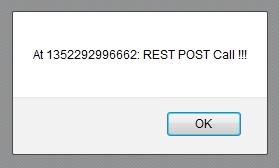
If you click on any button, a pop-up will be displayed:


See here for more about REST • More Spring related posts here.

Tuesday, 6 November 2012

Spring MVC Error Handling

This post describes the different techniques to perform error handling in Spring MVC 3. The code is available on GitHub in the Spring-MVC-Error-Handling directory. It is based on the Spring MVC With Annotations examples.

Handling Exceptions Before Spring 3

Before Spring 3, exceptions were handled with HandlerExceptionResolvers. This interface defines a single method:
ModelAndView resolveException(
  HttpServletRequest request,
  HttpServletResponse response,
  Object handler,
  Exception ex)
Notice it returns a ModelAndView object. Therefore, encountering an error meant being forwarded to a special page. However, this method is not suited for REST Ajax calls to JSONs (for example). In this case, we do not want to return a page, and we may want to return a specific HTTP status code. A solution, described further, is available.

For the sake of this example, two fake CustomizedException1 and CustomizedException2 exceptions have been created. To map customized exceptions to views, one could (and can still) use a SimpleMappingExceptionResolver:
SimpleMappingExceptionResolver getSimpleMappingExceptionResolver() {

    SimpleMappingExceptionResolver result
        = new SimpleMappingExceptionResolver();

    // Setting customized exception mappings
    Properties p = new Properties();
    p.put(CustomizedException1.class.getName(), "Errors/Exception1");
    result.setExceptionMappings(p);

    // Unmapped exceptions will be directed there
    result.setDefaultErrorView("Errors/Default");

    // Setting a default HTTP status code
    result.setDefaultStatusCode(HttpStatus.BAD_REQUEST.value());

    return result;

}
We map CustomizedException1 to the Errors/Exception1 JSP page (view). We also set a default error view for unmapped exception, namely CustomizedException2 in this example. We also set a default HTTP status code.

Here is the Exception1 JSP page, the default page is similar:
<%@page contentType="text/html" pageEncoding="UTF-8"%>
<%@ taglib prefix="c" uri="http://java.sun.com/jsp/jstl/core" %>
<!doctype html>
<html lang="en">
<head>
  <meta http-equiv="Content-Type" content="text/html;" charset=UTF-8">
  <title>Welcome To Exception I !!!</title>
</head>
<body>
    <h1>Welcome To Exception I !!!</h1>
    Exception special message:<
    ${exception.specialMsg}
    <a href="<c:url value='/'/>">Home</a>
</body>
</html>
We also create a dummy error controller to help triggering these exceptions:
@Controller
public class TriggeringErrorsController {

    @RequestMapping(value = "/throwCustomizedException1")
    public ModelAndView throwCustomizedException1(
        HttpServletRequest request,HttpServletResponse response)
            throws CustomizedException1 {

        throw new CustomizedException1(
            "Houston, we have a problem!");
    }

    @RequestMapping(value = "/throwCustomizedException2")
    public ModelAndView throwCustomizedException2(
        HttpServletRequest request,HttpServletResponse response)
            throws CustomizedException2 {

        throw new CustomizedException2(
            "Something happened on the way to heaven!");
    }

    ...

}
Before Spring 3, one would declare a SimpleMappingExceptionResolver as a @Bean in web.xml. However, we will use a HandlerExceptionResolverComposite which we will describe later.

We also configure a target page for HTTP status codes in web.xml, which is an other way to deal with issues:
<error-page>
    <error-code>404</error-code>
    <location>/WEB-INF/pages/Errors/My404.jsp</location>
</error-page>

What Is New Since Spring 3.X?

The @ResponseStatus annotation is a new mean to set a Http status code when a method is invoked. These are handled by the ResponseStatusExceptionResolver. The @ExceptionHandler annotation facilitates the handling of exceptions in Spring. Such annotations are processed by the AnnotationMethodHandlerExceptionResolver.

The following illustrates how these annotations can be used to set an HTTP status code to the response when our customized exception is triggered. The message is returned in the response's body:
@Controller
public class TriggeringErrorsController {

    ...

    @ExceptionHandler(Customized4ExceptionHandler.class)
    @ResponseStatus(value=HttpStatus.BAD_REQUEST)
    @ResponseBody
    public String handleCustomized4Exception(
        Customized4ExceptionHandler ex) {

        return ex.getSpecialMsg();

    }

    @RequestMapping(value = "/throwCustomized4ExceptionHandler")
    public ModelAndView throwCustomized4ExceptionHandler(

        HttpServletRequest request,HttpServletResponse response)
            throws Customized4ExceptionHandler {

        throw new Customized4ExceptionHandler("S.O.S !!!!");

    }

}
On the user side, if one uses an Ajax call, the error can be retrieved with the following (we are using JQuery):
$.ajax({
    type: 'GET',
    url:  prefix + "/throwCustomized4ExceptionHandler",
    async: true,
    success: function(result) {
        alert('Unexpected success !!!');
    },
    error: function(jqXHR, textStatus, errorThrown) {
        alert(jqXHR.status + " " + jqXHR.responseText);
    }
});
Some people using Ajax like to return a JSON with the error code and some message to handle exceptions. I find it overkill. A simple error number with a message keeps it simple.

Since we are using several resolvers, we need a composite resolver (as mentioned earlier):
@Configuration
public class ErrorHandling {

    ...

    @Bean
    HandlerExceptionResolverComposite getHandlerExceptionResolverComposite() {

        HandlerExceptionResolverComposite result
            = new HandlerExceptionResolverComposite();

        List<HandlerExceptionResolver> l
            = new ArrayList<HandlerExceptionResolver>();

        l.add(new AnnotationMethodHandlerExceptionResolver());
        l.add(new ResponseStatusExceptionResolver());
        l.add(getSimpleMappingExceptionResolver());
        l.add(new DefaultHandlerExceptionResolver());

        result.setExceptionResolvers(l);

        return result;

}
The DefaultHandlerExceptionResolver resolves standard Spring exceptions and translates them to corresponding HTTP status codes.

Running The Example

Once compiled, the example can be run with mvn tomcat:run. Then, browse:

  http://localhost:8585/spring-mvc-error-handling/

The main page will look like this:

Spring MVC Error Handling

If you click on the Exception 1 link, the following page will display:

Spring MVC Exception Handling

If you click on the Exception 2 link, the following page will display:


If you click on the Exception Handler button, a pop-up will be displayed:

Spring MVC Exception Handling Pop-Up

These techniques are enough to cover error handling in Spring.

More Spring related posts here.

Sunday, 4 November 2012

Fetching JSON With Ajax In Spring MVC Context

This post explains how to fetch a JSON using Ajax from a Spring MVC web application. It is based on the Spring MVC With Annotations and Serving Static Resources With Spring MVC examples. The code is available on GitHub in the Spring-Fetching-JSON-With-Ajax directory.

Main Index Page

We use a simple index.jsp page, where we set a button that fetches a JSON, and a <div> where the result will be displayed:
<%@page contentType="text/html" pageEncoding="UTF-8"%>
<%@ taglib prefix="c" uri="http://java.sun.com/jsp/jstl/core" %>
<!doctype html>
<html lang="en">
<head>
  <meta http-equiv="Content-Type" content="text/html;" charset=UTF-8">
  <script type="text/javascript"
    src="https://ajax.googleapis.com/ajax/libs/jquery/1.8.2/jquery.min.js">
  </script>
  <script type="text/javascript"
    src="<c:url value='/resources/js/FetchingJsonWithAjax.js'/>">
  </script>
  <title>Welcome To Fetching JSON With Ajax !!!</title>
</head>
<body>
    <h1>Fetching JSON With Ajax !!!</h1>
    <div id="theJson"></div>
    <button type="button" onclick="fetch_json()">
        Fetch JSON
    </button>
</body>
</html>

Javascript

On the button, we attach the fetch_json() Javascript method, which is called when the button is clicked:
var fetch_json = function() {

    $.ajax({
        type: 'GET',
        url:  "/spring-fetching-json-with-ajax/getJSON",
        dataType: 'json',
        async: true,
        success: function(result) {

            var tmp = "Fetch time is: " + result.milliTime + " !"
               + "and the JSON is:"
               + JSON.stringify(result);

            $("#theJson").html(tmp);

        },
        error: function(jqXHR, textStatus, errorThrown) {
            alert("Issue fetching the JSON: "
                + textStatus + " "
                + errorThrown + " !");
        }

    });

}
If successful, we set the result on the <div>, else we pop-up a message with the error.

Controller

The controller is kept simple, and a MilliTime object is returned for the Ajax call:
@Controller
public class MyController {

    @RequestMapping(value = "/")
    public String home(Model model) {
        return "index";
    }

    @RequestMapping(value="/getJSON", method = RequestMethod.GET)
    public @ResponseBody MilliTimeItem getJSON() {
        return new MilliTimeItem(System.currentTimeMillis());
    }

}

Running The Example

Once compiled, the example can be run with mvn tomcat:run. Then, browse:

  http://localhost:8585/spring-fetching-json-with-ajax/

After clicking on the Fetch JSON button, something similar to the following will be displayed:


More Spring related posts here.
Monday, 29 October 2012

Returning a JSON in Spring (With Annotations)

This post provides the simplest example to return a JSON from a Spring controller. It is based on the Spring MVC With Annotations example. The code is available on GitHub in the Spring-Returning-A-JSON directory.

For a full Spring MVC REST calls with Ajax example, see here.

Dependencies

On top of current dependencies, we add the Jackson mapper dependency:
<dependency>
    <groupId>org.codehaus.jackson</groupId>
    <artifactId>jackson-mapper-asl</artifactId>
    <version>1.9.10</version>
</dependency>
This dependency enables the conversion of Java objects into a JSON representation.

Data

For this example, we use a simple SomeData class:
public class SomeData {

    private String name;
    private long time;

    public SomeData(String name, long time) {
        this.name = name;
        this.time = time;
    }

    public SomeData() {
        name = "";
        time = System.currentTimeMillis();
    }

    // Setters & Getters

}

Controller

We modify our controller as following:
@Controller
public class MyController {

    @RequestMapping(value = "/")
    public String home() {
        return "index";
    }

    @RequestMapping(value="/getJSON/{name}", method = RequestMethod.GET)
    public @ResponseBody SomeData getJSON(@PathVariable String name) {

        SomeData result
            = new SomeData(name, System.currentTimeMillis());

        return result;

    }

}
The getJSON() method has special annotations usage:
  • @RequestMapping's value contains {name} which will be extracted by Spring an inserted as the parameter value in the method.
  • @ResponseBody's indicates that the body of the response to the user's request must be filled with what is returned by the method. Here, we return a SomeData object. Since we have added the Jackson dependency, Spring will automatically detect it and perform the conversion of this object into its JSON representation.
  • @PathVariable extracts the parameter's name from the URL's {name} and sets its as the parameter value in the getJSON() method.

JSP Index Page

Our index page remains very simple:
<%@page contentType="text/html" pageEncoding="UTF-8"%>
<%@ taglib prefix="c" uri="http://java.sun.com/jsp/jstl/core" %>
<!doctype html>
<html lang="en">
<head>
    <meta charset="utf-8">
    <title>Welcome !!!</title>
</head>
<body>
    <h1>
    Welcome To Spring Returning A JSON !!!
    </h1>
    <a href="<c:url value='/getJSON/Arthur'/>">Get JSON for Arthur !!!</a>
</body>
</html>
It contains a link making a call to /getJSON/Arthur.

Running The Example

Once compiled, the example can be run with mvn tomcat:run. Then, browse:

  http://localhost:8383/spring-returning-a-json/.

The home page will display:


Click on the link to retrieve the JSON:


More Spring related posts here.

Wednesday, 24 October 2012

Introduction To REST Concepts

Introduction

This post aims at demystifying the REST (Representational State Transfert) web design concepts. REST is based on a client server model. REST is a set of principles describing how standards can be used to develop web applications, for example. Its main purpose is to anticipate on common implementation issues and organize the relationship between logical clients and servers. You could call it a set of best practices!

In practice, REST provides guidance on how to implement web application interfaces to the web. Typically, one says a web application is constructed in a REST-like way or not. REST is often associated (or implemented) with HTTP, but it could be implemented with other technologies too. REST is platform and language independent.

Roy Fielding, the inventor of REST, says REST aims at achieving the following:
  • Generality Of Interfaces - All web applications should implement their interfaces the same way. By sharing the same convention, other applications know how to call yours, and you know how to call theirs. Minimal learning curve for each new application.
  • Independent Deployment of Components - Once an application and its REST interfaces have been implemented and deployed, one must be able to implement or re-implement, and deploy any REST interfaces without having to rewrite or modify existing ones.
  • Encapsulate Legacy Systems - Existing applications which are not implemented in a REST-like way can be wrapped with REST interfaces, making them REST-like applications.
  • Intermediary Components To Reduce Interaction Latency - For example, in order to handle traffic, it is common to distribute user/client requests to several physical servers (which is not to be confused with logical servers). This is transparent for users. Since REST uses interfaces, implementing or adding extra layered components, such as physical servers to handle a peak of client requests, is easy.
  • Emphasizing The Scalability Of Component Interactions - This is complementary to the previous point. 
  • Enforce Security - Exchanging information over the Internet can be risky. Hackers can use it to twist the system. REST principles eliminate many of those risks.

Concepts

  • Resource - A logical resource is any concept (car, dog, user, invoice...) which can be addressed and referenced using a global identifier. Typically, each resource is accessible with a URI when implementing REST over HTTP (for example: http://www.mysite.com/invoice/34657).
  • Server - A logical server is where resources are located, together with any corresponding data storage features. Such servers do not deal with end user interfaces (GUI).
  • Client - Logical clients make requests to logical servers to perform operations on their resources. For example, a client can request the state of the resource, create a resource, update a resource, delete a resource, etc... Clients do not possess resources or corresponding data storage features. However, they deal with end user interfaces (GUI).
  • Request and Responses - The interactions between client and servers is organized with requests from client to server, and responses to requests from server back to client. Requests can contain representations of the resource.
  • Representation - A representation is a document representing the current status of a resource. It can also be the new desired status when a client makes a request to update a resource, for example.

Principles

Here are some principles applicable in REST-like applications:
  • The state of a resource remains internal to the server, not the client - The client can request it, or update it with requests made to the server.
  • No client context saved on the server between requests - The server must not store the status of a client. Otherwise, this would break the scalability objective of REST when reaching a couple million users. Remember that requests can be distributed to several physical servers, which could cause physical resource consumption issues.
  • Client requests contain all information to service it - No matter which request is sent by a client to a server, it must be complete enough for the server to process it.
  • Session states are stored on the client side - If necessary, any information about the status of the communication between a logical server and a logical client must be held on the client side.
  • Multiple representations of a resource can coexist - The chosen format used to represent the state of a resource in requests and responses is free (XML, JSON...). Multiple formats can be used.
  • Responses explicitly indicate their cacheability - When a server returns a response to a request, the information it contains may or may not be cached by the client. If not, the client should make new requests to obtain the latest status of a resource, for example.
  • Code on Demand - This is an optional feature in REST. Clients can fetch some extra code from the server to enrich their functionalities. An example is Javascript.
About session states, implementing a login logout (i.e., authentication) system between a physical server and a physical client requires saving session information on the server side. Otherwise, if it were saved on the client side, it could be hacked from the client side.

There is a general agreement that whatever 'resource' is required to implement authentication between the client and the server is considered out-of-scope for REST. These authentication resources do not have to follow REST principles (see here for more details).

REST Over HTTP

When implementing REST over HTTP, the logical REST client is typically a web browser and the logical REST server is a web server. The REST API (or service) must be hypertext driven.

About resource IDs:
  • The preference is given to nouns rather than verbs to indicate the type of a resource (cat, dog, car...).
  • The unique ID of a resource is a URI, for example: http://www.mysite.com/invoice/34657.
  • A group of resources can also be accessed with a URI, for example: http://www.mysite.com/user/7723/invoices.
It is also considered good practice to use URIs in resource representations when a resource refers to another resource. For example, in a XML document representing a resource:
<dog self='www.mysite.com/dog/923' >
    <name>Lassie</name>
    <owner ref='www.mysite.com/owner/411' />
</dog>

In order to perform operations on resources, simple HTTP is used to make calls between machines. HTTP knows several types of calls: PUT, GET, POST, DELETE, HEAD, CONNECT, PATCH, TRACE and OPTIONS.

However, REST only uses four: PUT, GET, POST and DELETE.
  • GET - Clients can request the status of a resource by making an HTTP GET request to the server, using the resource's URI. REST requires that this operation does not produce any side effect to the resource's status (nullipotent).
  • PUT - Creates a new resource. Since the client does not know the next invoice number, the URI can be: http://www.mysite.com/invoice. If the resource is already created, it is not recreated. In other words, a REST PUT on http://www.mysite.com/invoice/841 (for example) is (and must be) idempotent. Invoice 841 must not be created multiple times if clients call that PUT several times.
  • POST - REST requires POST client requests to update the corresponding resource with information provided by the client, or to create this resource if it does not exist. This operation is not idempotent.
  • DELETE-  This operation removes the resource forever. It is idempotent.
REM: Implementing a http://www.mysite.com/invoice/add  URI is not considered a REST compliant pratice.

The format (JSON, XML...) used to return representations of resources is set in the media type of the server response (Multipurpose Internet Mail Extensions - MIME).

In order to handle success or errors issues, HTTP REST recommends using one of the HTTP Status Code.

Additional Read

Wednesday, 15 August 2012

How Bad Traffic Kills Your Earnings (and Solution)

A quick post to share some interesting insight I experienced recently on my blog. It receives traffic from all over the world. But recently, I noticed a peak from Russia. I checked the Referring URLs to my blog in the Stats > Traffic Sources menu.

Referring URL - Bad Traffic


All this traffic was coming from the same referring URL. At the beginning, I was not really concerned by this, but it became more and more annoying. I was trying to perform some statistical analysis, and I knew this traffic was nothing but bad data.

I decided to report it to Google via this page. Within two days, this traffic was gone. Then, something unexpected happened. I was monitoring my Page RPM (revenue per mille, or per thousand page impression) from my AdSense account. It got multiplied between 5x - 10x. My good versus bad traffic ratio was miles from this ratio.

In other words, a site with 10 000 views with a RPM of 0.10$ and (say) 15% bad traffic would generate 1$. After removing the bad traffic, and assuming a 7x increase in RPM, it would generate 10 000 * 85% * 0.1 * 7 = 5.95$. That is, an extra 4.95$.

Conclusion: bad traffic kills your earnings! Get rid of it!

Saturday, 11 August 2012

Blogging - Silly Mistakes Hampering Traffic Development

This is a checklist of silly mistakes one can easily correct to improve blog traffic:
  • Ugly Layout - A bad looking blog, with a bad or lazy layout, but still readable will only succeed if it has fantastic and valuable content for its readers. But then again, why shoot yourself in the foot by giving a bad first impression? Why make it hard to the eye for the user? On the other side, a very good looking blog without valuable content never takes off (especially on the long term).
  • Colors - Never use black as a color. It is not a natural color.
  • Spelling & Grammar Mistakes - There is an inverse correlation between page ranking and the number of spelling and grammar mistakes on a blog. The more mistakes, the lower the ranking.
  • Broken links - Broken links are an extremely frustrating experience to readers, especially when they are visiting your blog for the first time. It is a big indicator of its quality and people often stick to first impressions. Broken links kill your returning visitors rate. Yet, there is a simple and free tool available online to detect broken links on your blog. Use it.
  • Internal links - Make cross references (i.e., links) between your posts if these are relevant to the topic or for the user. It will ease the navigation on your blog, which is good for the reader.
  • Same Post Title - I made the silly mistake of using the same title on multiple post: Summary - Part I, Summary - Part II, Summary - Part III... This is not a good idea since post titles are often used by Google to differentiate them. These are also (often) displayed when people make searches. If a title does not inform the user of the content of the post, change it to include words related to the content.
  • Keywords in URLs - A little boost in ranking is to use keywords related to the content of your post in the URL. If you did not use that trick for existing posts, never mind. Leave it for new posts only.
  • Keywords in Titles - Proper keywords related to the content of posts are important not only for search engines ranking, but also when users make searches and scan results for valuable links. A post title is a front door. Make sure all your posts have relevant keywords in their titles.
  • Small Posts Don't Count For Much - Unfortunately, I can't find the reference anymore, but someone mentioned that Google more or less ignores posts containing less than 250-300 words. I could not find any confirmation of this, but somehow, it makes sense. Blogging is not Tweeting. Blogging is about substance.
  • No Translation Widget - The moment I added a translation widget on my blog, I started receiving traffic from all over the world.
  • No Social Buttons - You need to give means to visitors to share your blog posts. This is so easy to achieve with ShareThis for example. I explain how to achieve this in another post.
  • No 'Search This Blog' Widget - Returning visitors may remember one of your posts, but can't find it anymore. This widget will help them find it again. If you don't add this widget, there is a higher probability that they will give up.
  • No Subscription Widget - Some of your readers will be interested in your new posts. You have to provide them means to subscribe to your blog by email or with feeds. Install the corresponding widgets.
  • No Followers Widget - Build a crowd of followers by allowing them to join your blog. Add the corresponding widget.
  • Not Enabling Comments - Let people participate to the dynamics of your blog. Let them put comments on your posts. You always have the possibility to filter these if necessary.
  • No Labels On Posts - Labels are a mean to tag your posts (at least on Blogger). For example: vegetarian recipe, chicken recipe, etc... Have them displayed below each post. They will appear as links that users can click. If they do so, they will access all posts having the corresponding tag. This is great for navigating between posts.
  • No Navigation Links - On Blogger, use pages (you have maximum 20 per blog) to create menu pages, then install the page widget to let readers access them. It is another mean to organize your blog and make it accessible to users.
  • No Feedback Widget - Readers like to read feedback information about your blog (for example, with the statistic widget). I personally love the popular widget, which displays the most popular posts on your blog. Readers are interested in this information.
  • Not Listing Your Blog - On Blogger, make sure the visibility of your blog is set to true in the settings. It will be listed on Blogger and accessible by all search engines. Think about Technorati listing to have an idea of how you blog fares compared to other blogs.
  • Low Stamina Posting - That is the ultimate traffic killer. Blogging is nothing less than running a marathon. You need to post frequently and have at least 50-100 relevant and valuable posts before raising significant and regular traffic. Don't be obsessed about posting exactly 2 posts per day, and don't wait until you have 30 post before dumping them all. Just post them as they are ready. Don't strategize, it does not help with traffic. Do post often.
  • Quality vs Quantity - If you have 20 posts and meet all quality requirements described above, it won't help with traffic. You may see small spikes in traffic as you work on quality, but it will not be sustainable. When it comes to blogging, quantity trumps quality (unless content is mediocre). In other words: quality support quantity, but not the other way round.
More web related posts here.

Thursday, 9 August 2012

JAXB Annotation - XmlAdapter, Map, Special Types Annotations

Code examples are available from Github in the JAXB-JSON-XML-Marshalling directory.

How to use XmlAdapter and @XmlJavaTypeAdapter to handle Map in JAXB?

In situations where JAXB cannot handle unknown types, the solution is to create an XmlAdapter and use the @XmlJavaTypeAdapter in the class referring to the unknown type to indicate JAXB how to deal with it. A Java map is a good example.

We are going to illustrate this with an example. Assuming an object containing a generic map:
@XmlRootElement
public class ObjectWithGenericMap<K, V> {

    private Map<K,V> map;

    @XmlElement
    @XmlJavaTypeAdapter(JaxbMapAdaptor.class)
    public Map<K,V> getMap() {
        return map;
    }

    public void setMap(Map<K,V> map) {
        this.map = map;
    }

}
We are going to need an adaptor:
public class JaxbMapAdaptor<K, V>
        extends XmlAdapter<JaxbMapToList<K, V>, Map<K, V>> {

    @Override
    public Map<K, V> unmarshal(JaxbMapToList<K, V> v)
            throws Exception {
        HashMap<K, V> result = new HashMap<K, V>();
        for (JaxbMapToListEntry<K, V> jme : v.getList()) {
            result.put(jme.getKey(), jme.getValue());
        }
        return result;
    }

    @Override
    public JaxbMapToList marshal(Map<K, V> v) throws Exception {
        JaxbMapToList<K, V> result = new JaxbMapToList<K, V>();
        for (Map.Entry<K, V> entry : v.entrySet()) {
            JaxbMapToListEntry<K, V> jme = new JaxbMapToListEntry<K, V>();
            jme.setKey(entry.getKey());
            jme.setValue(entry.getValue());
            result.getList().add(jme);
        }
        return result;
    }

}

Basically, the above adaptor converts a map into a list of entries (with key and value) when marshalling, and converts this list of entries back into a HashMap when unmarshalling.

The map-to-list and corresponding entries are:
public class JaxbMapToList <K, V> {

    private List<JaxbMapToListEntry<K, V>> list
        = new ArrayList<JaxbMapToListEntry<K, V>>();

    public JaxbMapToList() {}

    public JaxbMapToList(Map<K, V> map) {
        for (Map.Entry<K, V> e : map.entrySet()) {
            list.add(new JaxbMapToListEntry<K, V>(e));
        }
    }

    public List<JaxbMapToListEntry<K, V>> getList() {
        return list;
    }

    public void setList(List<JaxbMapToListEntry<K, V>> entry) {
        this.list = entry;
    }

}

public class JaxbMapToListEntry<K, V> {

    private K key;
    private V value;

    public JaxbMapToListEntry() { }

    public JaxbMapToListEntry(Map.Entry<K, V> e) {
        key = e.getKey();
        value = e.getValue();
    }

    @XmlElement
    public K getKey() {
        return key;
    }

    public void setKey(K key) {
        this.key = key;
    }

    @XmlElement
    public V getValue() {
        return value;
    }

    public void setValue(V value) {
        this.value = value;
    }

}
Assuming one instantiates the object with generic map with destination and transports:
@XmlRootElement
public class Destination {

    private String destination;

    public String getDestination() {
        return destination;
    }

    @XmlElement
    public void setDestination(String dest) {
        this.destination = dest;
    }

}

@XmlRootElement
public class Transport {

    private String transport;

    public String getTransport() {
        return transport;
    }

    @XmlElement
    public void setTransport(String transp) {
        this.transport = transp;
    }

}

public static void main(String[] args) throws JAXBException {

    JAXBContext jaxbContext = JAXBContext.newInstance(
        ObjectWithGenericMap.class,
        Destination.class, Transport.class);

    ObjectWithGenericMap<Destination,Transport> owgm
        = new ObjectWithGenericMap<Destination,Transport>();

    Map<Destination,Transport> map
        = new HashMap<Destination,Transport>();
    owgm.setMap(map);

    Destination d = new Destination();
    d.setDestination("Paris");

    Transport t = new Transport();
    t.setTransport("Plane");

    map.put(d,t);

    d = new Destination();
    d.setDestination("New-York");

    t = new Transport();
    t.setTransport("Boat");

    map.put(d,t);

    ObjectWithGenericMap<Destination,Transport> retr
        = marshallingUnmarshalling(jaxbContext, owgm);

    for (Entry<Destination, Transport> e : retr.getMap().entrySet() ){
        Destination retrd = e.getKey();
        System.out.print(retrd.getDestination());
        Transport retrt = e.getValue();
        System.out.println(" " + retrt.getTransport());
    }

}
The generated XML and verification is:
<?xml version="1.0" encoding="UTF-8" standalone="yes"?>
<objectWithGenericMap>
    <map>
        <list>
            <key xsi:type="destination" xmlns:xsi="http://www.w3.org/2001/XMLSchema-instance">
                <destination>New-York</destination>
            </key>
            <value xsi:type="transport" xmlns:xsi="http://www.w3.org/2001/XMLSchema-instance">
                <transport>Boat</transport>
            </value>
        </list>
        <list>
            <key xsi:type="destination" xmlns:xsi="http://www.w3.org/2001/XMLSchema-instance">
                <destination>Paris</destination>
            </key>
            <value xsi:type="transport" xmlns:xsi="http://www.w3.org/2001/XMLSchema-instance">
                <transport>Plane</transport>
            </value>
        </list>
    </map>
</objectWithGenericMap>
Paris Plane
New-York Boat

How to use: @XmlList, @XmlEnum, @XmlAttribute, @XmlValue, @XmlMimeType, @XmlInlineBinaryData?


To annotate an enum:
@XmlEnum
public enum MyEnum {

    @XmlEnumValue("v1")
    VAL_1,

    @XmlEnumValue("v2")
    VAL_2;

}
To specify the xml tag value and attributes:
@XmlAccessorType(XmlAccessType.FIELD)
public class SpecialItem {

    @XmlValue
    private String val;

    @XmlAttribute
    private String attribute1;

    @XmlAttribute
    private String attribute2;

    // Setter & Getters...

}
For remaining annotations and usage of the above:
@XmlAccessorType(XmlAccessType.FIELD)
@XmlRootElement
public class MultipleTypes {

    @XmlElement
    private MyEnum myEnum;

    @XmlElement
    @XmlList
    private List<String> data;

    @XmlElement
    private List<SpecialItem> specialItems;

    @XmlMimeType("image/jpeg")
    private Image image;

    @XmlInlineBinaryData
    private byte[] byteArray;

    // Setter & Getters...

}
The generated XML and verification is:
<?xml version="1.0" encoding="UTF-8" standalone="yes"?>
<multipleTypes>
    <myEnum>v2</myEnum>
    <data>tre pml xng</data>
    <specialItems attribute2="ffff" attribute1="aaaa">pppp</specialItems>
    <specialItems attribute2="pqgd" attribute1="mer">xxw</specialItems>
    <image>/9j/4AAQSkZJRgABAgAAAQABAAD/2wBDAAgGBgcGBQgHBwcJCQgKDBQNDAsLDBkSEw8UHRofHh0aHBwgJC4nICIsIxwcKDcpLDAxNDQ0Hyc5PTgyPC4zNDL/2wBDAQkJCQwLDBgNDRgyIRwhMjIyMjIyMjIyMjIyMjIyMjIyMjIyMjIyMjIyMjIyMjIyMjIyMjIyMjIyMjIyMjIyMjL/wAARCAALABADASIAAhEBAxEB/8QAHwAAAQUBAQEBAQEAAAAAAAAAAAECAwQFBgcICQoL/8QAtRAAAgEDAwIEAwUFBAQAAAF9AQIDAAQRBRIhMUEGE1FhByJxFDKBkaEII0KxwRVS0fAkM2JyggkKFhcYGRolJicoKSo0NTY3ODk6Q0RFRkdISUpTVFVWV1hZWmNkZWZnaGlqc3R1dnd4eXqDhIWGh4iJipKTlJWWl5iZmqKjpKWmp6ipqrKztLW2t7i5usLDxMXGx8jJytLT1NXW19jZ2uHi4+Tl5ufo6erx8vP09fb3+Pn6/8QAHwEAAwEBAQEBAQEBAQAAAAAAAAECAwQFBgcICQoL/8QAtREAAgECBAQDBAcFBAQAAQJ3AAECAxEEBSExBhJBUQdhcRMiMoEIFEKRobHBCSMzUvAVYnLRChYkNOEl8RcYGRomJygpKjU2Nzg5OkNERUZHSElKU1RVVldYWVpjZGVmZ2hpanN0dXZ3eHl6goOEhYaHiImKkpOUlZaXmJmaoqOkpaanqKmqsrO0tba3uLm6wsPExcbHyMnK0tPU1dbX2Nna4uPk5ebn6Onq8vP09fb3+Pn6/9oADAMBAAIRAxEAPwCxBe6S1ha3ptg4MEYF29lGSXKA5JIznHvmuX1UaCmhapbwxW2023mxkWUSyedsbjPXaOTkdPX+9wieM/EEOlrpkeoEWS7SIfKQj5Rgfw88AflUb+JdVl0O7tHniMMkqbh9njDcq4Pzbcjj0PrXppRo3SuTVqVKrV7aH//Z</image>
    <byteArray>AQL9/A==</byteArray>
</multipleTypes>
pppp aaaa ffff
xxw mer pqgd
VAL_2
tre, pml, xng, 
1 2 -3 -4
Image is available: true

Remark

We have not covered all JAXB annotations, especially those related to XML schemas, but this tutorial should be enough to get one started and accomplish most objectives with JXTA.

JAXB to XML • JAXB to JSON • JAXB Annotations Tutorial Table Of Content

Tuesday, 7 August 2012

JAXB Annotation - Can't Handle Interfaces

JAXB Can't Handle Interfaces in Generics

If you have a class with a List<Vehicle> and Vehicle is an interface, JAXB will throw an Exception at runtime:
my.package.MyInterface is an interface,
    and JAXB can't handle interfaces
The solution is to maket the interface an abstract class. For example:
public abstract class Vehicle {

    public abstract String getType();

}

@XmlRootElement
public class Bus extends Vehicle {

    private String type;

    public Bus() { };

    public Bus(String type) {
        this.type = type;
    }

    @XmlElement
    @Override
    public String getType() {
        return type;
    }

    public void setType(String type) {
        this.type = type;
    }

}

@XmlRootElement
public class Car extends Vehicle {

    private String type;

    public Car() {};

    public Car(String type) {
        this.type = type;
    }
 
    @XmlElement
    @Override
    public String getType() {
        return type;
    }

    public void setType(String type) {
        this.type = type;
    }

}

@XmlRootElement
public class ObjectWithListOfVehicles {

    private List<Vehicle> list;

    @XmlElementWrapper(name="MyVehicleList")
    @XmlElement
    public List<Vehicle> getList() {
        return list;
    }

    public void setList(List<Vehicle> list) {
        this.list = list;
    }

}
Assuming the following JAXB context:
public static void interfaceExamples() throws JAXBException {

    List<Vehicle> l = new ArrayList<Vehicle>();
    l.add(new Bus("Large bus"));
    l.add(new Bus("Small bus"));
    l.add(new Car("Ferrari"));

    // Object with generic list
    ObjectWithListOfVehicles owgl
        = new ObjectWithListOfVehicles();
    owgl.setList(l);

    JAXBContext jc = JAXBContext.newInstance(
        Bus.class, Car.class,
        ObjectWithListOfVehicles.class);

    ObjectWithListOfVehicles retr
        = marshallUnmarshall(owgl, jc);

    for (Vehicle s : retr.getList()) {
        System.out.println(
            s.getClass().getSimpleName()
            + " - " + s.getType());
    } System.out.println(" ");

}

public static <O> O marshallUnmarshall(O o, JAXBContext jc)
        throws JAXBException {

    // Creating a Marshaller
    Marshaller jaxbMarshaller = jc.createMarshaller();
    jaxbMarshaller.setProperty(Marshaller.JAXB_FORMATTED_OUTPUT, true);

    StringWriter result = new StringWriter();
    jaxbMarshaller.marshal(o, result);

    // Printing XML
    String xml = result.toString();
    System.out.println(xml);

    // Creating an Unmarshaller
    Unmarshaller jaxbUnmarshaller = jc.createUnmarshaller();
    StringReader sr = new StringReader(xml);

    O retr = (O) jaxbUnmarshaller.unmarshal(sr);

    return retr;

}
The generated XML and verification is:
<?xml version="1.0" encoding="UTF-8" standalone="yes"?>
<objectWithListOfVehicles>
    <MyVehicleList>
        <list xsi:type="bus" xmlns:xsi="http://www.w3.org/2001/XMLSchema-instance">
            <type>Large bus</type>
        </list>
        <list xsi:type="bus" xmlns:xsi="http://www.w3.org/2001/XMLSchema-instance">
            <type>Small bus</type>
        </list>
        <list xsi:type="car" xmlns:xsi="http://www.w3.org/2001/XMLSchema-instance">
            <type>Ferrari</type>
        </list>
    </MyVehicleList>
</objectWithListOfVehicles>

Bus - Large bus
Bus - Small bus
Car - Ferrari

Notice that JAXB is capable of recreating both Bus and Car instances.

Next

JAXB to XML • JAXB to JSON • JAXB Annotations Tutorial Table Of Content

JAXB Annotation - JAXB Context, Generics

Understanding JAXB Context

In order to marshall and unmarshall JAXB annotated classes, one needs to create a JAXBContext. The instantiator method takes in a list of JAXB annotated Class.

By default, JAXB will include statically referenced classes in the list and inherited classes, but not transient or inheriting classes. The code examples are available from Github in the JAXB-JSON-XML-Marshalling directory.

Assuming:
@XmlRootElement
public class StaticallyReferenced {

    private String data;

    @XmlElement
    public String getData() {
        return data;
    }

    public void setData(String data) {
        this.data = data;
    }
    
}

@XmlRootElement
public class StaticallyReferencedButTransient {
    
    private String data;

    @XmlElement
    public String getData() {
        return data;
    }

    public void setData(String data) {
        this.data = data;
    }
    
}

@XmlRootElement
public class SomeA {
    
    private StaticallyReferenced sr;
    private StaticallyReferencedButTransient srbt;

    @XmlElement
    public StaticallyReferenced getSr() {
        return sr;
    }

    public void setSr(StaticallyReferenced sr) {
        this.sr = sr;
    }

    @XmlTransient
    public StaticallyReferencedButTransient getSrbt() {
        return srbt;
    }

    public void setSrbt(
            StaticallyReferencedButTransient srbt) {
        this.srbt = srbt;
    }

}

@XmlRootElement
public class InheritSomeA extends SomeA {
    
    private String moreData;

    @XmlElement
    public String getMoreData() {
        return moreData;
    }

    public void setMoreData(String moreData) {
        this.moreData = moreData;
    }
    
}
If one creates the following JAXB context:
JAXBContext jaxbContext =
    JAXBContext.newInstance(SomeA.class);
JAXB will only be able to process SomeA and StaticallyReferenced, not StaticallyReferencedButTransient or InheritSomeA.

How to use JAXB with Generics such as List, Set, etc...?

Assuming a simple example, where an object contains a List<String>:
@XmlRootElement
public class ObjectWithList {

    private List<String> list;

    @XmlElementWrapper(name="MyList")
    @XmlElement
    public List<String> getList() {
        return list;
    }

    public void setList(List<String> list) {
        this.list = list;
    }

}
If the JAXB context is built as following (before a round trip):
public static void simpleExample() throws JAXBException {

    List<String> l = new ArrayList<String>();
    l.add("Somewhere");
    l.add("This and that");
    l.add("Something");

    // Object with list
    ObjectWithList owl = new ObjectWithList();
    owl.setList(l);

    JAXBContext jc = JAXBContext.newInstance(ObjectWithList.class);
    ObjectWithList retr = marshallUnmarshall(owl, jc);

    for (String s : retr.getList()) {
        System.out.println(s);
    } System.out.println(" ");

}
The generated XML with verification is:
<?xml version="1.0" encoding="UTF-8" standalone="yes"?>
<objectWithList>
    <MyList>
        <list>Somewhere</list>
        <list>This and that</list>
        <list>Something</list>
    </MyList>
</objectWithList>

Somewhere
This and that
Something
A more sophisticated example with a generic list:
@XmlRootElement
public class ObjectWithGenericList<T> {

    private List<T> myList;

    @XmlElementWrapper(name="MyGenericList")
    @XmlElement
    public List<T> getList() {
        return myList;
    }

    public void setList(List<T> list) {
        this.myList = list;
    }

}
used with the following JAXB context and verification:
public static void genericListExample()
        throws JAXBException {

    List<Car> l = new ArrayList<Car>();
    l.add(new Car("red car"));
    l.add(new Car("blue car"));
    l.add(new Car("green car"));

    // Object with generic list
    ObjectWithGenericList<Car> owgl
        = new ObjectWithGenericList<Car>();
    owgl.setList(l);

    JAXBContext jc = JAXBContext.newInstance(
        ObjectWithGenericList.class, Car.class);
    ObjectWithGenericList<Car> retr
        = marshallUnmarshall(owgl, jc);

    for (Car s : retr.getList()) {
        System.out.println(
        s.getClass().getSimpleName() + " - " + s.getType());
    } System.out.println(" ");

}
generates the following XML:
<?xml version="1.0" encoding="UTF-8" standalone="yes"?>
<objectWithGenericList>
    <MyGenericList>
        <list xsi:type="car" xmlns:xsi="http://www.w3.org/2001/XMLSchema-instance">
            <type>red car</type>
        </list>
        <list xsi:type="car" xmlns:xsi="http://www.w3.org/2001/XMLSchema-instance">
            <type>blue car</type>
        </list>
        <list xsi:type="car" xmlns:xsi="http://www.w3.org/2001/XMLSchema-instance">
            <type>green car</type>
        </list>
    </MyGenericList>
</objectWithGenericList>

Car - red car
Car - blue car
Car - green car
Notice that JAXB is capable of recreating Car instances.

Next

JAXB to XML • JAXB to JSON • JAXB Annotations Tutorial Table Of Content